
Back for some FX-map tips. This time- adding additional functionality to existing nodes. Our target is the Splatter Circular. I won't be going into details how Allegorithmic set it up, but I'll try to explain how to identify what you need to modify and how, to actually make our improved node.
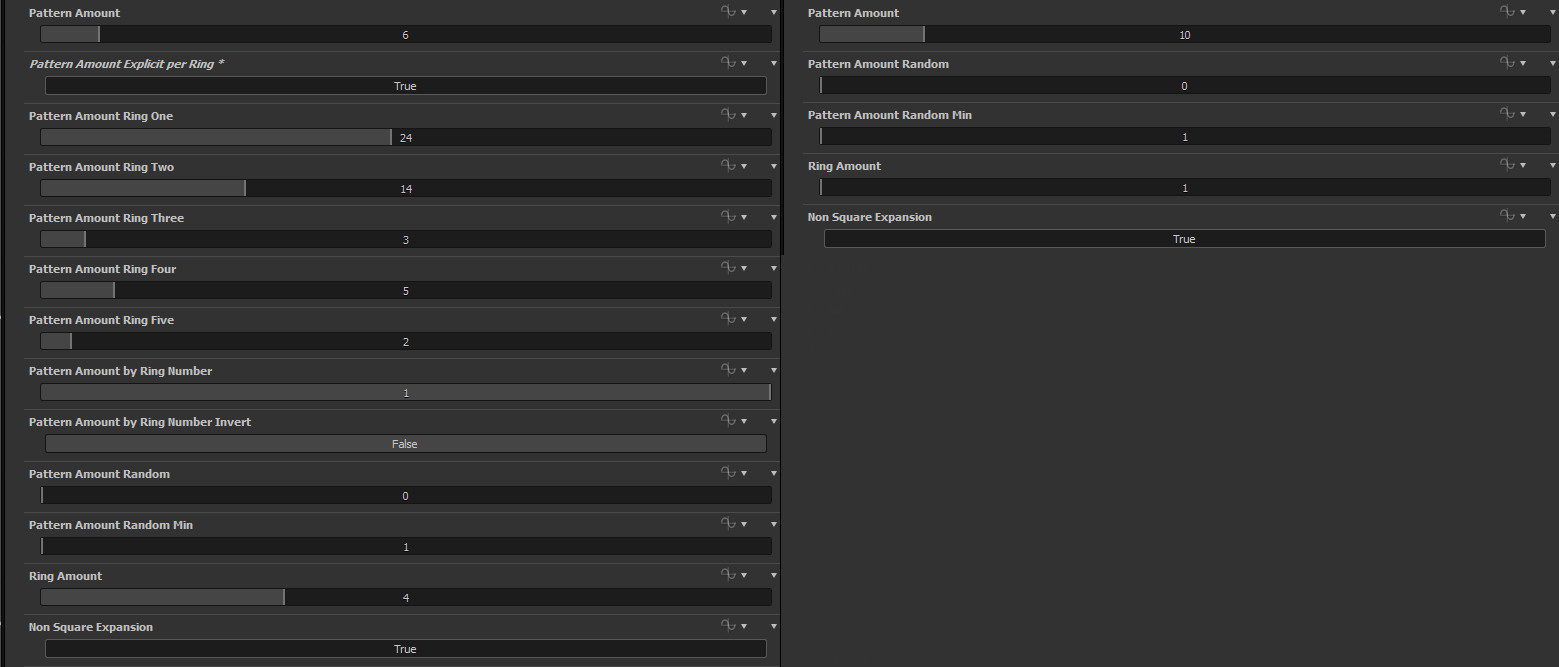
So, what are we doing? We want to control the Pattern Amount by our ring number and as a bonus- to explicitly state the Pattern Amount per ring(going up to ring 5 only, didn't think more was necessary). Our first control will be |Patter Amount * ring number|,giving us 0*n, 1*n, 2*n, 3*n and so on. I could've added a check not to have that 0 in there, but it still works fine without it, we just lose our first ring. The other control is pretty self explanatory, we set the Pattern Amount for each ring ourselves. That's what the UI of my edited Splatter Circular looks like:
First thing we need to do- study how the node is set up. It's not one of the easiest nodes and has quite some math in it. Starting top to bottom inside the FX-map is the way to go. Parameters set in topmost nodes can be re-used in bottom nodes. So starting from the top is the easiest way to see what we have available. As you can see, we have an Iterate, followed by a Switch, then 2 other Iterates and a Quadrant at the end. As I said, we won't be going too much into the mathy stuff for the whole node. Our goal is to find where the Pattern Amount calculations are and get our math in there.

The top Iterate basically sets some variables for later use. The Switch does some mathy stuff, but we don't have the Pattern Amount we need in here, passing by, nothing to see here people. Then we have an Iterate with only a ring_amount inside, so that's not it either. Then the final Iterate has what we need on the bottom left. See? No need to even go into the Quadrant to expect it. Here at the top we can see the variable we need being set- ringNumber and ringNumberInverted.
Top Iterate
 Switch
 Bottom Iterate
At first, we have only a Pattern Amount control and a Randomized Pattern amount control which are plugged into a Lerp. If you study some other nodes you can see that all the randomization is controlled by a Lerp connecting to the regular, not randomized value. That's nice because you can then expose it with a slider. For anyone unsure what a Linear Interpolate(lerp) function does: it gets value a and value b and mixes them using a value c. 0 to 1 range. 0 being all a and 1 being all b.
Now to get started. We need to multiply the pattern amount by our rings. Luckily for us, we have a ringNumber variable and a ringNumberInverted variable. Cleanest way I could think of doing that for the UI later on was to create a If/Else node and plug a Get Boolean variable for the condition. So when we expose it we can have "Invert ring number" button. Depending if you want more shapes on the inside or outside. Then, we multiply this Ring Number(inverted) result with our Pattern Amount and feed that into a Lerp. Create a Get Float node to control the lerp and name it patter_amount_by_ring_number. And as I explained above- 0 is pure Pattern Amount, 1 is multiplied by ringNumber.
It's really easy once you track down and identify how the node is set up. That takes care of our first control. Now onto the next one- explicitly set the amount per ring.
First things first- we need to set the Pattern Amount to 0. Easiest way to do that? Get a Subtract node and plug the Pattern Amount in both inputs(x-x=0). Or you could multiply it by 0. Either way, we get 0(our amount is always positive, so subtraction works). Now we can start setting our amount per ring. To do that, we need to create a simple check and repeat that for each ring(up to 5 in my example).

Get a Comparison/Equal node and plug into the top input our ringNumber. In the bottom input plug in a Integer 0(1 for the second ring, 2 for the third ring and so on). We use integers to keep things clean and then cast it to float. As in most cases, Substance starts counting from 0, so our first ring's value is 0 and not 1. This will be our Rule for the If/Else node. If ringNumber==0, use our explicitly set amount. If not, use our normal PatternAmount. We do this so we can later switch on the explicit by ring number control.
Then create a GetInteger variable and name it ring_zero(ring_one,ring_two and so on for the other rings).This becomes our exposed control for the amount per ring. Create a CastToFloat and plug that in a Add node. In the other input of the Add node we plug in our pattern amount which we set to 0. Plug that into the middle input of the If/Else check. In the bottom input of the If/Else we plug in the normal PatternAmount.
From here, we repeat the exact same steps for all the other rings. Just copy/paste those nodes. In the bottom input of the If/Else node you plug in the result from the previous If/Else node. When we are done with the calculations for each ring, create another If/Else node. In the middle input plug in the final result we got. In the bottom- plug in the result from the previous lerp(which is our normal PatternAmount). For the check we create a getBoolean node and name it explicit_pattern_number_per_ring. When we expose our controls, this becomes the switch. We do this AFTER the randomization lerp because we don't want it to be random.
I'll leave out exposing the parameters, as it's just like in any other case. Just make sure the names from the Get/Float/Integer/Boolean match your exposed parameter.
Feel free to leave any comments/questions. Also, if anyone is interested in a video tutorial, do say so, I might be able to do something about it. I'll update the blog post with a link to SubstanceShare if the node gets approved.