
Ad Infinitum

Been a long time since my last blog post! Nothing too technical this time around, just some patterns. :) A while back I tried some patterns and recently had to do some more at work. Thought it was time to try and go at it with some more effort.
 The main pattern that I created
So...first thing is - GET SOME REFERENCES! It doesn't matter if you go and copy it 1:1 or just use it for inspiration. Having a reference will help you along the way. When you're doing intricate patterns, chances are you're going to get a lot of nodes in your graph. Try to keep your colour nodes as few as possible. For this one I had 6 uniform colour nodes set to 16x16px. Don't get overwhelmed by all the different elements the pattern has! Break it 1 by 1, start center to edges or the other way around. Just don't jump around back and forth, as your graph will get messy and you won't be able to iterate easily.
I didn't use any special techniques here. It's just shape/polygon/transform/splatter circular/shape mapper. Yup, 5 kinds of nodes are enough to get the job done for pattern creation. Ok, there was a little trick to get the secondary colour for the crossing patterns, but let's keep it simple in this post. Here's a GIF to show the order in which I added each element:
 You can see at the end I'm going back a bit, but that's because I felt the pattern was a bit empty there.
Secondly, do you want to get more patterns out of your initial pattern? Because this is where the fun begins. This technique depends on symmetry and your overall pattern, but feel free to try it out and share your results! I think I got around 32 different patterns from the initial one above.

So, here are some different patterns, extracted from the main one. And again, not much going on here. It's mostly 2D Transform and a little trick with the Tile Generator. Let's see how this goes:

Imagine you pattern is subdivided in all those smaller areas. Each one of these areas holds a possibility to create a whole new pattern. How can we get these? Using a Transform 2D to scale up or down( x2 or /2), offsetting by 0.5 on x, offsetting by 0.5 on y or any combination of those. Also, we can offset by 0.25, but this requires the Tile Sampler trick to tile properly. Let's see some examples:
 Main Pattern offset by 0.5 on x and y
 Main Pattern scaled x2
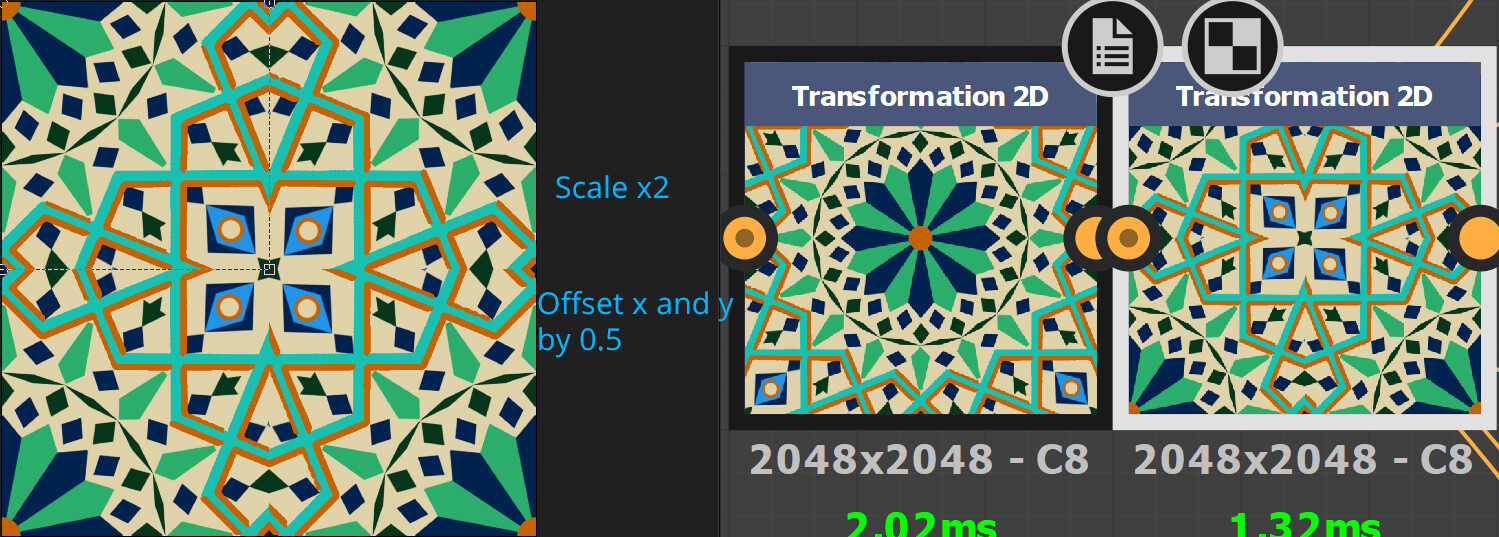 Main pattern scaled x2, then in another Transform 2D - offset by 0.5 on x and y
 Main pattern scaled x2, then in another Transform 2D - offset by 0.5 on x and y and scaled x2
With that said, there is something to keep in mind! Let's say we start off with a 2048 x 2048 image. The first time you do x2 you will be getting only 1024x1024 of detail. The second time 512x512 and so on. At some point you might see pixels. Is that an issue though?
An example: you create a tile generator that is 8 x 8 tiles. If your final resolution is 2048, each tile will be 2048/8 = 256 px. In this case you could have down-scaled the image once more to 256x256 and still have enough detail. Anything beyond that will be a loss.

So, that's the simple way to get tons of variation from your main pattern. It's important than you start with an intricate enough pattern to be able to break it down by sections. Now we can go and try offsetting by 0.25 and see what happens:
 This doesn't look right, does it? Notice on the Tile Generator there is a Quincunx Flip option. Here it's off.
 And here is the same thing, but with Quincunx flip on
There are probably other ways to get that result, but this seemed the simplest to me. You can generate a variation from your main pattern, then generate a variation from the variation and so on! As I said, I got about 32 patterns from this one. Here are some of them:


At the end of the day what matters is - how are you going to use those? You can easily use each pattern for some tile variation. You can Tile each pattern on it's own or use the already tiled patterns. Each one of those variations above is tileable. And, if you made your graph correctly and only used Uniform Colours, you can easily change the colour scheme of your pattern at any time.
This same technique could be easily applied to knitting patterns and other fabric patterns.
Something with those patterns: https://artstn.co/p/4bV9k4
Hope this has been useful!